🧊

Image-to-3D API

Turn one product photo into a textured 3D model.

Upload a photo, get back a GLB (or OBJ, FBX, USDZ, STL) in a few minutes. 4,495 credits per model, available on paid plans (Starter and up).

What it does

Image in, 3D file out. Asynchronous: submit a job, then poll for the result. Runs on a hosted 3D model.

Output

One textured mesh as GLB (default), OBJ, FBX, USDZ or STL. Materials: PBR (default), Shaded, All or None.

Input image

JPG, PNG or WebP, max 10 MB, shortest side at least 256 px. A clean product photo on a plain background works best; transparent PNG cut-outs are supported.

Render time

Usually a few minutes per model (no guarantee). Up to 2 models in progress per account.

Billing

4,495 credits per model. Paid plans only; failed jobs are refunded automatically.

Real example

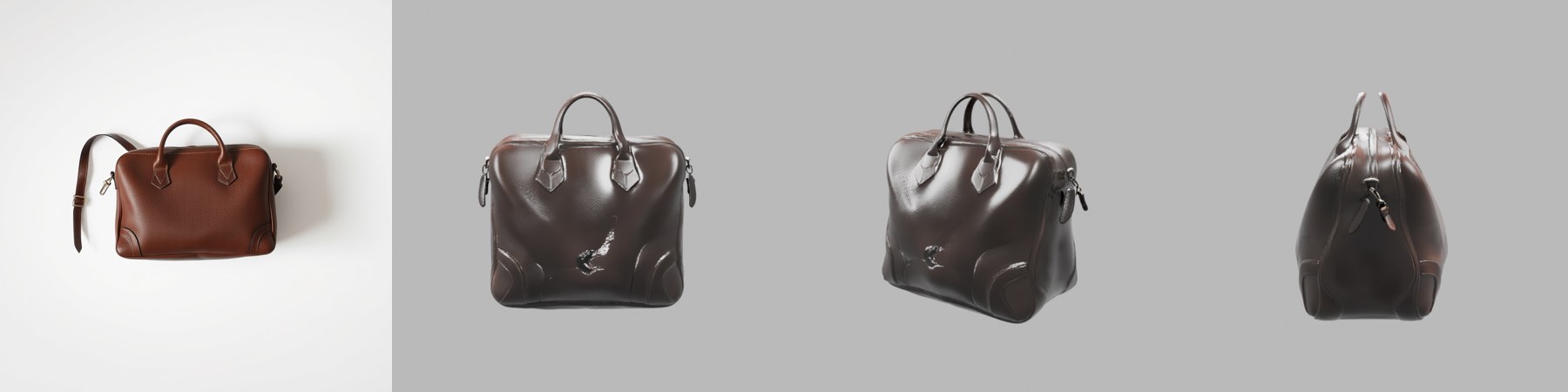
This is the actual output of one validation job, not a hand-picked showcase. It shows what works well and where the model falls short.

Input photo of a brown leather bag next to three rendered views of the generated 3D model
Input photo and three views of the generated 3D model. The shape, handles and side fittings came through; the shoulder strap was dropped, the leather came out darker and glossier than the photo, and a small dark blemish appears on the front panel.
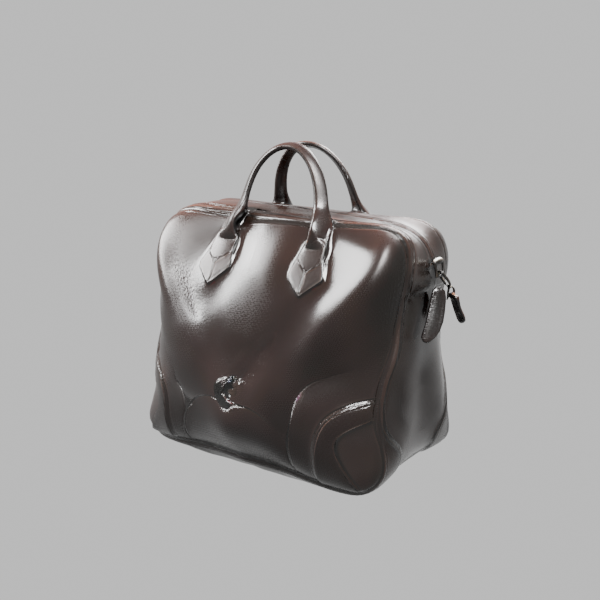
Three-quarter render of the generated 3D bag model on a grey background
Three-quarter render of the same GLB (about 36,000 faces, about 12 MB).

Honest limitations

  • Thin parts (straps, cords, wires) may be simplified or missing.
  • Colours and gloss can differ slightly from the photo.
  • Small surface blemishes can occur; check the model before production use.
  • Scale is normalised, not real-world units. Scale the model in your 3D tool.
  • Back and underside are inferred from a single photo.

Tips for a good model

Use a sharp, evenly lit photo of one object, filling most of the frame, on a plain background (or a transparent cut-out). Avoid heavy shadows, reflections and cropped edges.

API

Authenticate with Authorization: Bearer YOUR_API_KEY (create a key in the dashboard). Submit the job, then poll until status is completed or failed.

POST /v1/image-to-3d

Accepts multipart/form-data with an image file, or form/JSON with image_url or image_base64.

FieldTypeRequiredDescription
imagefileone ofInput image (JPG/PNG/WebP, max 10 MB, shortest side ≥ 256 px).
image_urlstringone ofPublic http/https URL of the input image (form or JSON).
image_base64stringone ofBase64-encoded image (form or JSON).
promptstringnoOptional hint about the object, max 400 characters; must not contain --.
formatstringnoglb (default) | obj | fbx | usdz | stl
materialstringnoPBR (default) | Shaded | All | None

Response: generation_id, status: "processing", credits_used, format, estimated_seconds (180) and poll_url. Poll GET /v1/image-to-3d/{generation_id}: status is processing, completed (then output_url is the 3D file) or failed (with error_message; credits refunded).

cURL

curl -X POST https://api.pixelapi.dev/v1/image-to-3d \ -H "Authorization: Bearer YOUR_API_KEY" \ -F "image=@bag.jpg" \ -F "format=glb" \ -F "material=PBR" # then poll every 15-30 s until status is "completed" (or "failed") curl https://api.pixelapi.dev/v1/image-to-3d/GENERATION_ID -H "Authorization: Bearer YOUR_API_KEY"

Python

import time, requests API = "https://api.pixelapi.dev" HEADERS = {"Authorization": "Bearer YOUR_API_KEY"} with open("bag.jpg", "rb") as f: job = requests.post(f"{API}/v1/image-to-3d", headers=HEADERS, files={"image": f}, data={"format": "glb", "material": "PBR"}).json() gen_id = job["generation_id"] while True: time.sleep(20) r = requests.get(f"{API}/v1/image-to-3d/{gen_id}", headers=HEADERS).json() if r["status"] == "completed": with open("bag.glb", "wb") as out: out.write(requests.get(r["output_url"]).content) break if r["status"] == "failed": raise RuntimeError(r.get("error_message")) # credits are refunded

Requires a paid plan (Starter and up); free-trial accounts receive an error and are not charged. At most 2 models can be in progress per account.
Pricing

Billed in credits. 1 credit = $0.001 on the Starter plan; the cash value of a credit depends on your plan. Failed jobs are refunded automatically.

Per 3D model
4,495 credits
One textured model in your chosen format. ≈ $4.50 per model on Starter. Paid plans only.

Third-party-hosted tool. Image-to-3D runs on a third-party hosted 3D model. Its price covers the provider's charge plus our running costs, and it is not matched to the lowest price on the market. See the pricing page for all third-party-hosted tools.

FAQ

How much does image-to-3D cost?

4,495 credits per 3D model (about $4.50 at 1 credit = $0.001 on the Starter plan; the cash value of a credit depends on your plan). Failed jobs are refunded automatically.

Why is it priced differently from your other tools?

Image-to-3D runs on a third-party hosted 3D model. Its price covers the provider's charge plus our running costs; it is not matched to the lowest price on the market. The same applies to our other third-party-hosted tools (Image-to-Video, VFX Studio paid models and the Memorial Video 'Bring photos to life' mode).

Who can use it?

Paid plans only (Starter and up). Free-trial credits cannot be used for image-to-3D. Up to 2 models can be in progress per account at a time.

Which output formats are supported?

GLB (default), OBJ, FBX, USDZ and STL. Set format in the request. Materials: PBR (default), Shaded, All or None.

How long does a model take?

Usually a few minutes (no guarantee). The API is asynchronous: submit, then poll GET /v1/image-to-3d/{generation_id} until status is completed or failed.

What image should I upload?

A clean product photo on a plain background works best; transparent PNG cut-outs are supported. JPG, PNG or WebP, up to 10 MB, shortest side at least 256 px.

What does the output look like?

One textured mesh (our validation model had about 36,000 faces; the GLB was about 12 MB). Scale is normalised, not real-world units, so scale the model in your 3D tool.

What are the limitations?

Thin parts such as straps and cords may be simplified or missing. Colours and gloss can differ slightly from the photo, and small surface blemishes can occur. Check the model before using it in production.

Is this the old /v1/3d/ API?

No. The older /v1/3d/ endpoints remain retired. Image-to-3D is a new endpoint: POST /v1/image-to-3d.

Ready to make your first 3D model?

Image-to-3D is available on paid plans, starting with Starter. See pricing.