Lensora Studio API
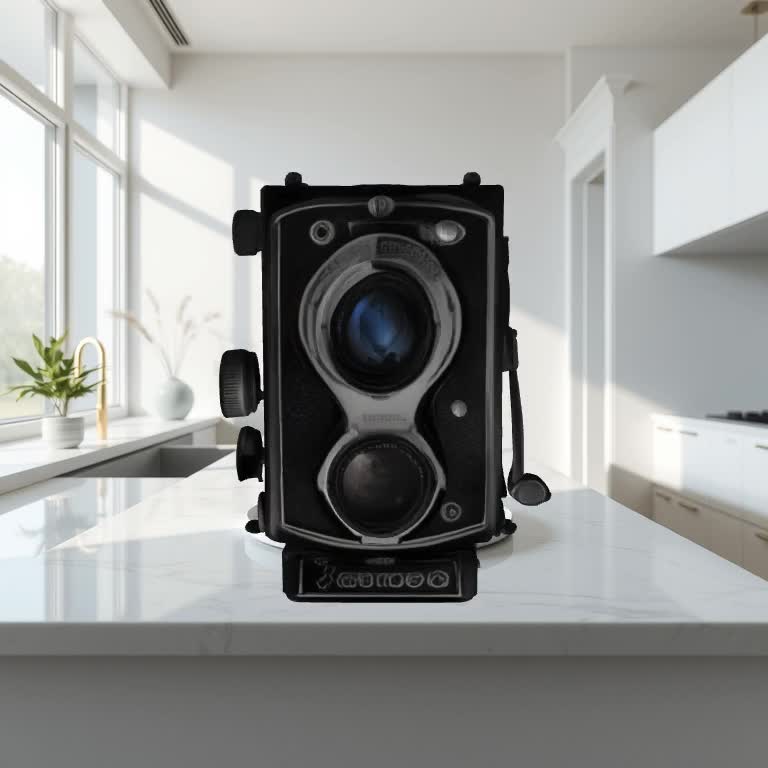
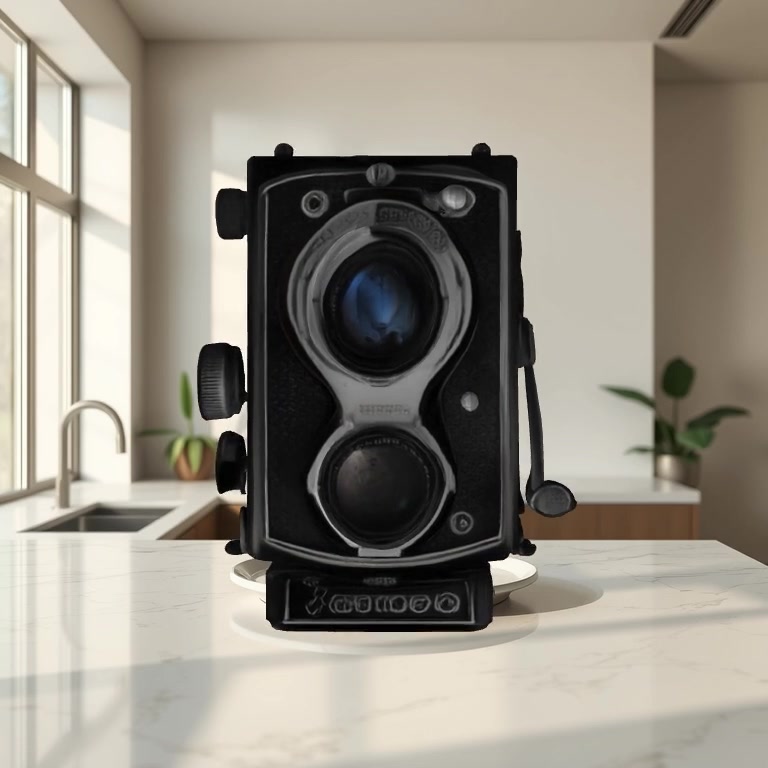
How it works
Lensora Studio is a two-call orchestrator that wraps four PixelAPI primitives behind a single guided flow:
- Detect — we run object detection on your photo and return up to 8 foreground proposals (bbox, label, category) so the user picks the subject.
- Cut + replace background — the chosen subject is segmented out; you can leave it transparent, drop in your own backplate URL, or describe a new scene in plain English.
- 3D generation — the cropped subject is reconstructed as a full 360° mesh with production-ready textures (real depth, not a flat slab).
- Cinematic render — the mesh is composited over your new background and rendered as a 24 fps MP4 from one of three camera moves:
turntable,dolly, orcinematic.
You make two HTTP calls. The first returns object proposals in < 2 s. The second runs the full pipeline in the background and you poll for the result.
Pricing
| Endpoint | Credits | USD | Refund on failure |
|---|---|---|---|
/v1/studio/init | 5 | $0.005 | n/a (charged on success only) |
/v1/studio/transform | 75 | $0.075 | Yes — auto-refunded if any stage fails or times out |
| End-to-end | 80 | $0.08 |
Monthly validity is required after the free trial. Pay-per-use. Median end-to-end runtime is ~3-4 minutes (object detection ≈ 1 s, the rest is parallel background-replace + 3D + render).
Endpoints
1. POST /v1/studio/init — upload + detect
Upload a photo. Get back object proposals plus a session_id you'll use for the transform call.
Request (multipart/form-data)
| Field | Type | Required | Description |
|---|---|---|---|
image | file | required | JPEG / PNG / WebP. Max 20 MB. |
max_objects | int | optional | Cap the number of returned proposals. Range 2-8, default 6. |
Example — cURL
curl -X POST https://api.pixelapi.dev/v1/studio/init \
  -H "Authorization: Bearer $PIXELAPI_KEY" \
  -F "image=@rolleiflex.jpg" \
  -F "max_objects=6"
Response
{
  "session_id": "2a91884c-1bb5-44e3-a6e0-7db0a5a56668",
  "source_url": "https://api.pixelapi.dev/uploads/3f27a1...jpg",
  "objects": [
    {
      "label": "vintage twin-lens reflex camera",
      "category": "product",
      "bbox": [0.18, 0.12, 0.79, 0.93]
    },
    {
      "label": "entire image (no crop)",
      "category": "full_frame",
      "bbox": [0.0, 0.0, 1.0, 1.0]
    }
  ],
  "suggested_actions": [],
  "credits_used": 5,
  "vlm_elapsed_ms": 842
}bboxis normalized[x1, y1, x2, y2]in 0-1 range, top-left origin.- The list always includes a synthetic "entire image (no crop)" entry so users can transform the full frame as one subject (good for logos, flat-lay collages, anything detection might over-segment).
- If the photo includes clothing,
suggested_actionswill recommend the/v1/video-tryonworkflow.
2. POST /v1/studio/transform — run the pipeline
Pick the object, choose a background, choose a camera. Returns a job_id immediately; the job runs in the background and you poll for status.
Request (application/json)
| Field | Type | Required | Description |
|---|---|---|---|
session_id | string | required | From /init. Sessions live 24h. |
object_index | int | optional | Index into the objects array. Default 0. |
background | object | required | See background modes below. |
camera_preset | string | optional | turntable · dolly · cinematic. Default turntable. |
Background modes
background.type | Other fields | What you get |
|---|---|---|
"remove" | none | Transparent background. The MP4 renders the subject on a clean white plate. |
"image" | url (public) | Your own backplate dropped in as the scene. |
"prompt" | prompt (string) | We generate a subject-free scene from your description and use it as the backplate. |
Example — cURL
curl -X POST https://api.pixelapi.dev/v1/studio/transform \
  -H "Authorization: Bearer $PIXELAPI_KEY" \
  -H "Content-Type: application/json" \
  -d '{
    "session_id": "2a91884c-1bb5-44e3-a6e0-7db0a5a56668",
    "object_index": 0,
    "background": {
      "type": "prompt",
      "prompt": "on a marble countertop with soft natural light"
    },
    "camera_preset": "turntable"
  }'
Response
{
  "job_id": "e76d4dfc-8e0a-4e1b-a5a2-4f9c8a14e2b3",
  "status": "queued",
  "credits_used": 75,
  "estimated_seconds": 240,
  "poll_url": "/v1/studio/result/e76d4dfc-8e0a-4e1b-a5a2-4f9c8a14e2b3"
}
3. GET /v1/studio/result/{job_id} — poll status
Poll every 3-5 seconds until status is completed or failed. Credits are refunded automatically on failure.
In-progress response
{
  "job_id": "e76d4dfc-8e0a-4e1b-a5a2-4f9c8a14e2b3",
  "status": "processing",
  "step": "generating-3d",
  "progress": 60,
  "scene_url": "https://api.pixelapi.dev/outputs/files/edits/.../scene.jpg"
}
The step field walks through these stages: starting → cropping → removing-bg → generating-bg → compositing → generating-3d → rendering-video → done.
Completed response
{
  "job_id": "e76d4dfc-8e0a-4e1b-a5a2-4f9c8a14e2b3",
  "status": "completed",
  "step": "done",
  "progress": 100,
  "output": {
    "mp4_url": "https://api.pixelapi.dev/dl/3d/.../turntable.mp4",
    "glb_url": "https://api.pixelapi.dev/dl/3d/.../model.glb",
    "scene_url": "https://api.pixelapi.dev/outputs/files/edits/.../scene.jpg",
    "removed_bg_url": "https://api.pixelapi.dev/outputs/files/edits/.../cutout.png"
  }
}
Four downloadable artifacts every job produces:
| Field | What it is | Use case |
|---|---|---|
mp4_url | The hero deliverable. 24 fps, 4 s, 768×768. | Drop into product pages, ads, social. |
glb_url | The reconstructed 3D mesh with production-ready textures. | AR previews, Blender/Unity/Unreal/Three.js. |
scene_url | The composited still — subject + new background. | Static product photo, thumbnails. |
removed_bg_url | Subject cutout with transparent alpha. | Re-use in your own compositing. |
Failed response
{
  "job_id": "e76d4dfc-...",
  "status": "failed",
  "error": "3D generation timeout",
  "progress": 0
}
When status == "failed", the 75 transform credits are automatically refunded to your account before the response is returned. The 5 /init credits are not refunded because object detection always succeeds on its own.
Camera presets
Each preset is a 4-second 24 fps render. Click play to compare:
Auto-orient is on by default. Before rendering, the model is auto-rotated so its largest face points square to the camera at angle 0. That means dolly never goes edge-on, and turntable never opens on a thin sliver, regardless of how the source photo was framed.
Full Python example
import os, time, requests

API = "https://api.pixelapi.dev"
KEY = os.environ["PIXELAPI_KEY"]
H = {"Authorization": f"Bearer {KEY}"}

# 1. INIT
with open("rolleiflex.jpg", "rb") as f:
    init = requests.post(f"{API}/v1/studio/init",
        headers=H, files={"image": f}).json()

print("session:", init["session_id"])
print("objects:")
for i, o in enumerate(init["objects"]):
    print(f" [{i}] {o['label']} ({o['category']})")

# 2. TRANSFORM
job = requests.post(f"{API}/v1/studio/transform",
    headers={**H, "Content-Type": "application/json"},
    json={
        "session_id": init["session_id"],
        "object_index": 0,
        "background": {
            "type": "prompt",
            "prompt": "on a marble countertop with soft natural light",
        },
        "camera_preset": "cinematic",
    }).json()

print("job:", job["job_id"], "ETA:", job["estimated_seconds"], "s")

# 3. POLL
while True:
    s = requests.get(f"{API}/v1/studio/result/{job['job_id']}",
                     headers=H).json()
    print(f" {s['status']:10} step={s.get('step','-'):20} pct={s.get('progress',0)}%")
    if s["status"] == "completed":
        out = s["output"]
        print("MP4:", out["mp4_url"])
        print("GLB:", out["glb_url"])
        # Download the MP4
        with open("output.mp4", "wb") as f:
            f.write(requests.get(out["mp4_url"]).content)
        break
    if s["status"] == "failed":
        print("FAILED:", s.get("error"))
        break
    time.sleep(4)
Node.js example
import fs from "fs";
import FormData from "form-data";
import axios from "axios";

const API = "https://api.pixelapi.dev";
const H = { Authorization: `Bearer ${process.env.PIXELAPI_KEY}` };

// 1. INIT
const form = new FormData();
form.append("image", fs.createReadStream("rolleiflex.jpg"));
form.append("max_objects", "6");
const init = (await axios.post(`${API}/v1/studio/init`, form, {
  headers: { ...H, ...form.getHeaders() },
})).data;

// 2. TRANSFORM
const job = (await axios.post(`${API}/v1/studio/transform`, {
  session_id: init.session_id,
  object_index: 0,
  background: { type: "prompt", prompt: "on a marble countertop with soft natural light" },
  camera_preset: "cinematic",
}, { headers: { ...H, "Content-Type": "application/json" } })).data;

// 3. POLL
while (true) {
  const s = (await axios.get(`${API}/v1/studio/result/${job.job_id}`, { headers: H })).data;
  console.log(`${s.status} step=${s.step} pct=${s.progress}`);
  if (s.status === "completed") { console.log("MP4:", s.output.mp4_url); break; }
  if (s.status === "failed") { console.log("FAILED:", s.error); break; }
  await new Promise(r => setTimeout(r, 4000));
}
Error codes
| HTTP | Meaning | What to do |
|---|---|---|
| 400 | Invalid image, bad background.type, object_index out of range, or bbox crop too small. | Re-check inputs. |
| 401 | Missing / invalid API key. | Pass Authorization: Bearer <key>. |
| 402 | Insufficient credits (need 5 for init, 75 for transform). | Top up at pixelapi.dev/billing. |
| 404 | Session expired (24h TTL) or job not found. | Restart with a fresh /init call. |
| 503 | Object detection temporarily unavailable. | Retry after a few seconds — no credits charged. |
Tips for best results
- Single hero subject in the frame. Detection works on multi-object photos but the 3D step gives the strongest output when one subject dominates.
- Mid-distance shots beat extreme close-ups. A little of the original scene around the subject gives the 3D step depth cues to work with.
- Even lighting helps texture quality. Harsh shadows get baked into the GLB albedo.
- Pick the smallest bbox that fully contains the subject. The orchestrator pads the crop generously on its own.
- Background prompts work best when they describe a scene, not just a color. “on a marble countertop with soft natural light” beats “white”.
- Pick the camera that matches the use: turntable for catalogs, dolly for ads, cinematic for launches.
Known limits
- The 3D model has no input signal for the underside of the object — the bottom is approximated and may show soft artifacts in extreme low-angle shots.
- Validated subject classes today: rigid products and discrete objects (cameras, bottles, tools, electronics, accessories, packaging). Humans, animals, and flat-lay clothing are out of scope for the 3D step in this version.
- Output MP4 is 768×768 at 24 fps. Higher resolutions are on the roadmap.