VFX Compose — drop the same subject into any scene, $0.015 a shot
Today we're shipping VFX Compose: an identity-safe scene-compositing API. Upload one photo of a subject, describe a world, and we'll put them in it — without redrawing their face.
If you've used "replace background" tools before, you know the trade-off: the matting is OK but the subject still sits like a sticker on top of the new scene. The lighting doesn't match, the shadows are wrong, and the moment you ask for anything more creative than "studio backdrop" the AI starts re-imagining your face on you.
VFX Compose was built to fix that without trading identity for creativity.
The honest version of how it works
There are three stages. None of them try to be clever about your face.
Stage 1 — Matte the subject. We use BiRefNet (MIT license) to pull an alpha matte from your input. BiRefNet is good at hair wisps, jewelry chains, and transparent elements like glass heels — exactly the things that go wrong when most tools flatten a subject to "person in front, background behind."
Stage 2 — Generate the scene. We dilate the matte slightly, invert it, and hand the source image plus the inverted mask to SDXL-Inpaint 0.1 (CreativeML OpenRAIL++-M, commercially usable). We strip subject-referring tokens from your prompt with a word-boundary regex — the woman, her, the model — so SDXL doesn't try to invent a second person inside the freshly painted background. Then, once SDXL is done, we alpha-composite your original subject pixels back on top of its output. Byte for byte. The face you uploaded is the face you get.
Stage 3 — Harmonize. A pure-classical step. We compute a Lab-space Reinhard color transfer from the subject's stats to the scene's stats, with a deliberately soft L_strength of 0.35 and ab_strength of 0.55 so the skin shifts toward the scene's light without losing detail. Then we estimate light direction from the brightest 5% of the new scene and project the alpha along that vector, blurred to 28px, to draw a procedural contact shadow under the feet. No model touches the face. No model touches the clothing. The subject is exactly what you uploaded — only warmer or cooler.
End-to-end this takes about 21 seconds per image on a single RTX 4070.
What it cost us, what it costs you
We ran the verified-rival sweep. Bria's Background Generation endpoint at $0.030/image is currently the cheapest direct competitor we could find with public pay-as-you-go pricing. Photoroom's Pro plan works out to about $0.10/image effective. Adobe Firefly's generative-fill calls cost ~$0.04 in their credit system.
Our internal cost-of-goods for a 21-second pipeline on shared 16GB hardware is well under our pricing target. So:
45 credits per call. $0.015 per image. 2× cheaper than Bria, exactly per our pricing rule.
If anyone undercuts us, we cut again. That's the rule.
A live shot, not an artist's impression
This isn't a launch animation. Six of these came back from the production API while we were writing this post. Same source photo. Six different prompts. ~21 seconds each. The face, the white blazer, the gold pendant chain, and the transparent block-heel sandals are pixel-identical across all six outputs — because they literally are the source pixels, alpha-composited on top of the SDXL background.

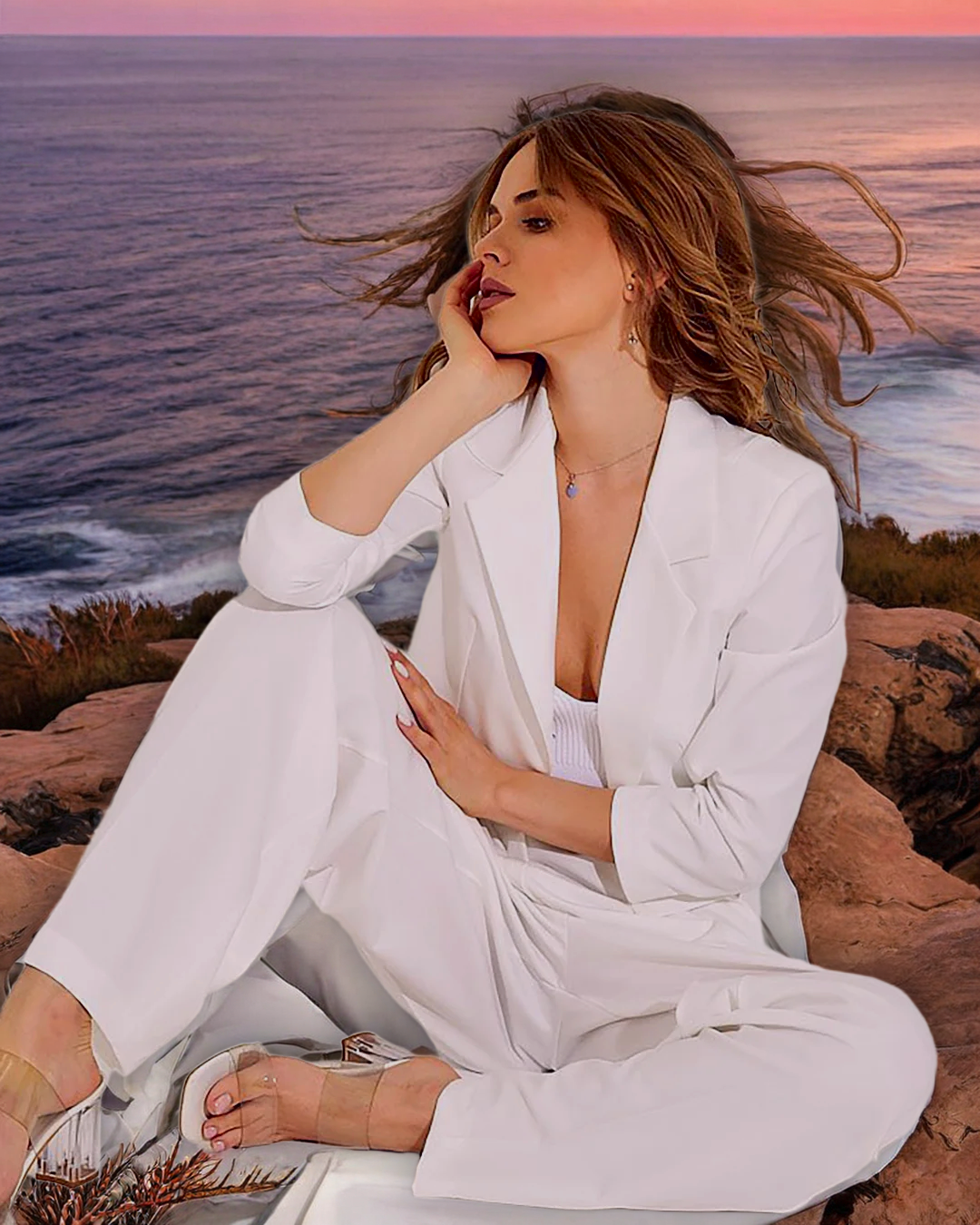

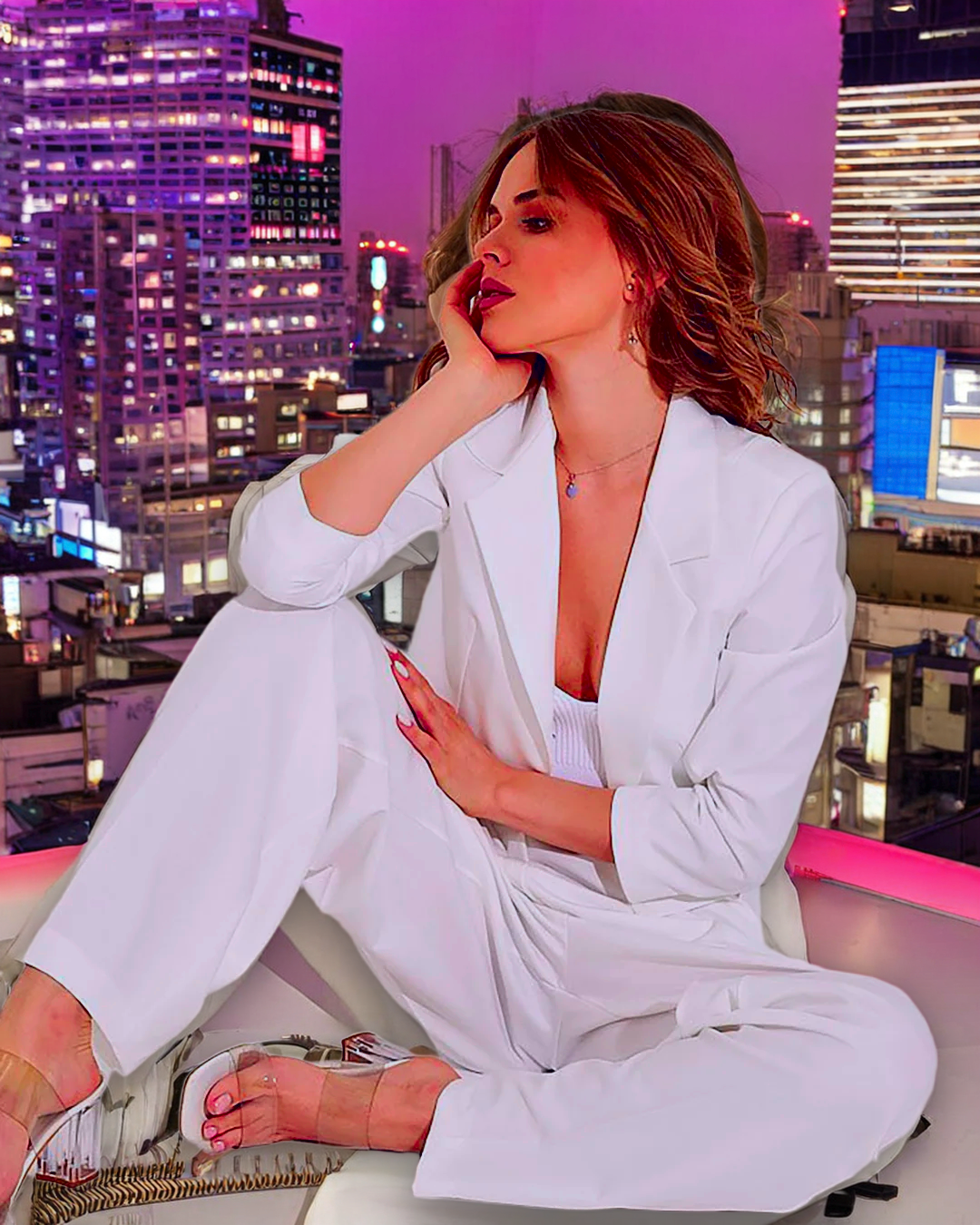


The harmonizer warmed the skin toward sunset and cooled it toward snow; that's the only thing that changed about the subject.
The thing we don't pretend works perfectly
We ran 7 prompts in the test sweep, not 6. The seventh — "Scottish moor at twilight" — came back with SDXL hallucinating a second person standing next to her, despite our negative-prompt filter explicitly listing person, woman, man, girl, boy, human figure. It happened on seed=42. We could regenerate with another seed and it would probably go away; we instead removed that prompt from the gallery and are documenting it here, because "impeccable output" doesn't mean "we hide the failure modes."
If you hit a similar issue, try a different seed, or be specific about the environment ("empty moor", "no other people in frame"). We're investigating a stronger token-strip plus a second-pass face-detect-and-veto check for a future v2.1.
How to call it
The API is live at POST /v1/image/vfx-compose:
curl -X POST https://api.pixelapi.dev/v1/image/vfx-compose \
  -H "Authorization: Bearer $PIXELAPI_KEY" \
  -F "[email protected]" \
  -F "prompt=Place the woman in a cozy living room with warm light coming through a large window."
You'll get back a job ID. Polling GET /v1/image/{id} for ~21 seconds returns:
{
  "id": "e8e40045-d1a3-48be-aabb-72c65ae6417b",
  "status": "completed",
  "operation": "vfx-compose",
  "output_url": "https://api.pixelapi.dev/outputs/vfx-compose/2026/05/13/...png",
  "credits_used": 45.0
}
Full parameter reference, Python and Node examples, and error codes are on the docs page.
What's open-source under the hood
We say "no commercial models under the hood" and mean it. The entire VFX Compose pipeline is:
| Component | Model | License |
|---|---|---|
| Matting | BiRefNet | MIT |
| Background | SDXL-Inpaint 0.1 | CreativeML OpenRAIL++-M |
| Harmonization | Lab-space Reinhard transfer | classical, no model |
| Shadow | Procedural alpha projection | classical, no model |
There is no FLUX-Dev (non-commercial), no SD 3.5 ($1M revenue cap), no BRIA RMBG-1.4 (commercial license required), no IC-Light V2 (FLUX-based, non-commercial), no Harmonizer (CC-BY-NC-SA). Nothing we couldn't legally re-host for a paying customer. We keep a license matrix and check it before shipping a model.
Where this fits in PixelAPI
If you want a subject on a flat new backdrop, our existing Replace Background tool is faster and cheaper (75 credits). If you want the subject to look like they were photographed inside a scene — a real environment with real spatial cues and matched tone — that's VFX Compose.
We didn't build this to be a Frankenstein "AI photo editor." We built it because PixelAPI's job is to give working creators tools that respect the input photo. The face is the thing you can't get back. Everything else is a render setting.
Try it free
New accounts get free credits. Hit the VFX Compose page, upload your subject, write a scene, and you'll see the result in about 21 seconds.
If you find a prompt where the identity guarantee breaks, send us the seed and the prompt at [email protected] — we'll get it into the regression set.
Built in Hyderabad. Shipping on real GPUs, real money, no royalty paid to OpenAI.